One of the best ways to explain the concept of a digital identity wallet is to turn it into a small but end-to-end system. For this reason, I developed a local lab that simulates not just a mobile interface, but also the roles of the document issuer, citizen wallet, and verifying authority.
In the first part of this three-part series, I explain the problem that inspired the prototype, why the architectural roles were separated, and how the approach of “proving the required attribute” rather than “sharing identity” was translated into code.
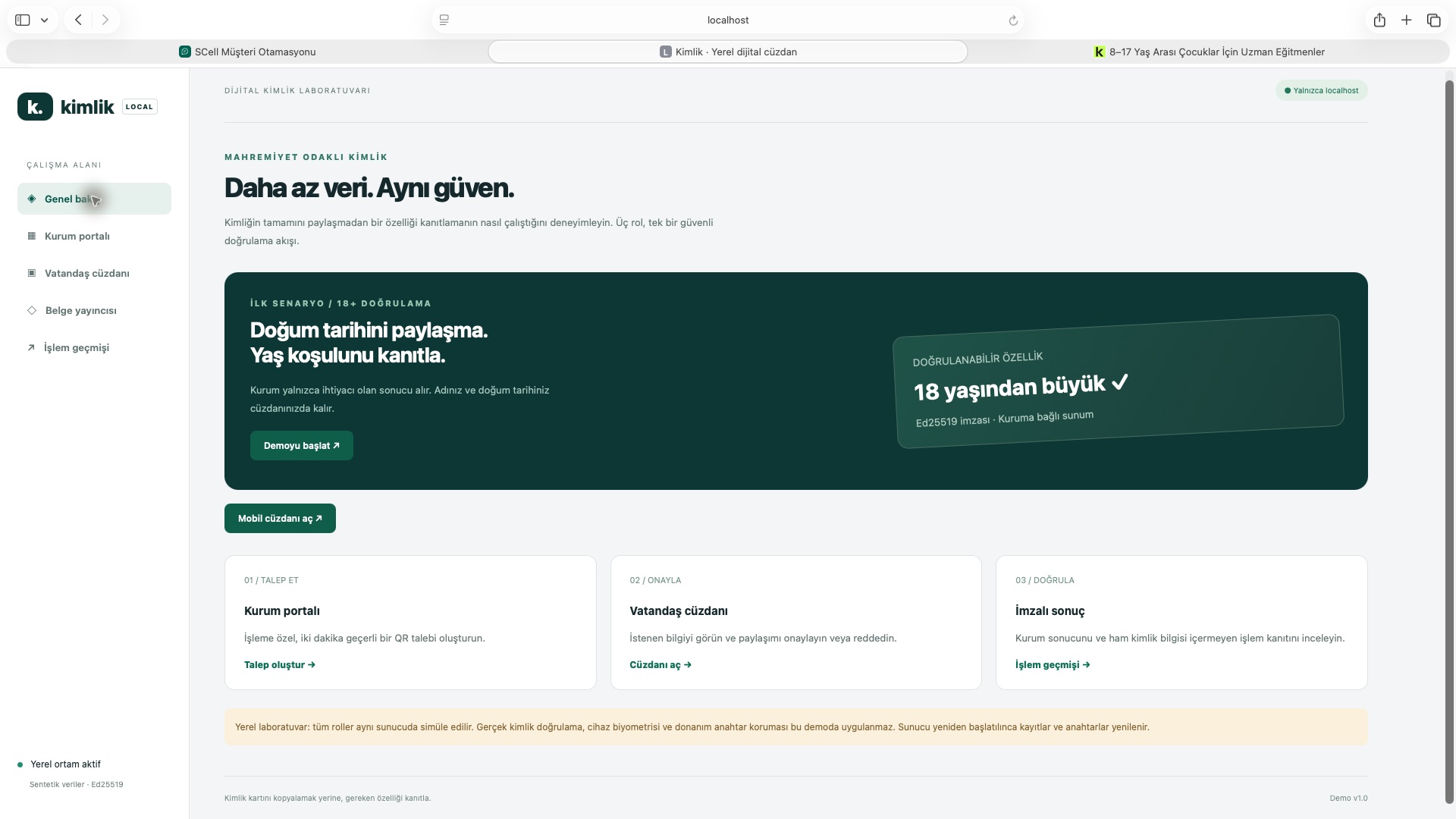
The local lab’s overview screen: request, approve, and verify. Screenshot from the initial revision.
The starting question: What information does the institution actually need?
An organization conducting age verification often does not need our name, date of birth, or ID number. For the organization to make a decision, it is sufficient for the result “over 18 years of age” to be verified by a reliable source.
Similarly, a municipality may only need the province and district of residence; a delivery company may only need the address for that specific transaction; and a social services agency may request specific household information—if authorized to do so. The fundamental principle of this approach is:
Instead of sending a digital copy of your ID card, provide only the smallest verifiable set of data required for the transaction.
The European Commission also defines selective disclosure as a data minimization feature that allows the wallet user to share only the requested attributes without revealing additional information. For this reason, the prototype’s data model was built around authorized fields based on the scenario, rather than around a “full identity record.”
Three roles, three distinct responsibilities
1. Issuer — document issuer
The issuer converts synthetic source fields into signed credentials. The hosted version uses ES256 with the P-256 key in SoftHSM; the API verifies credentials and disclosure results with the issuer public key. Device consent signatures are separate from this issuer signature.
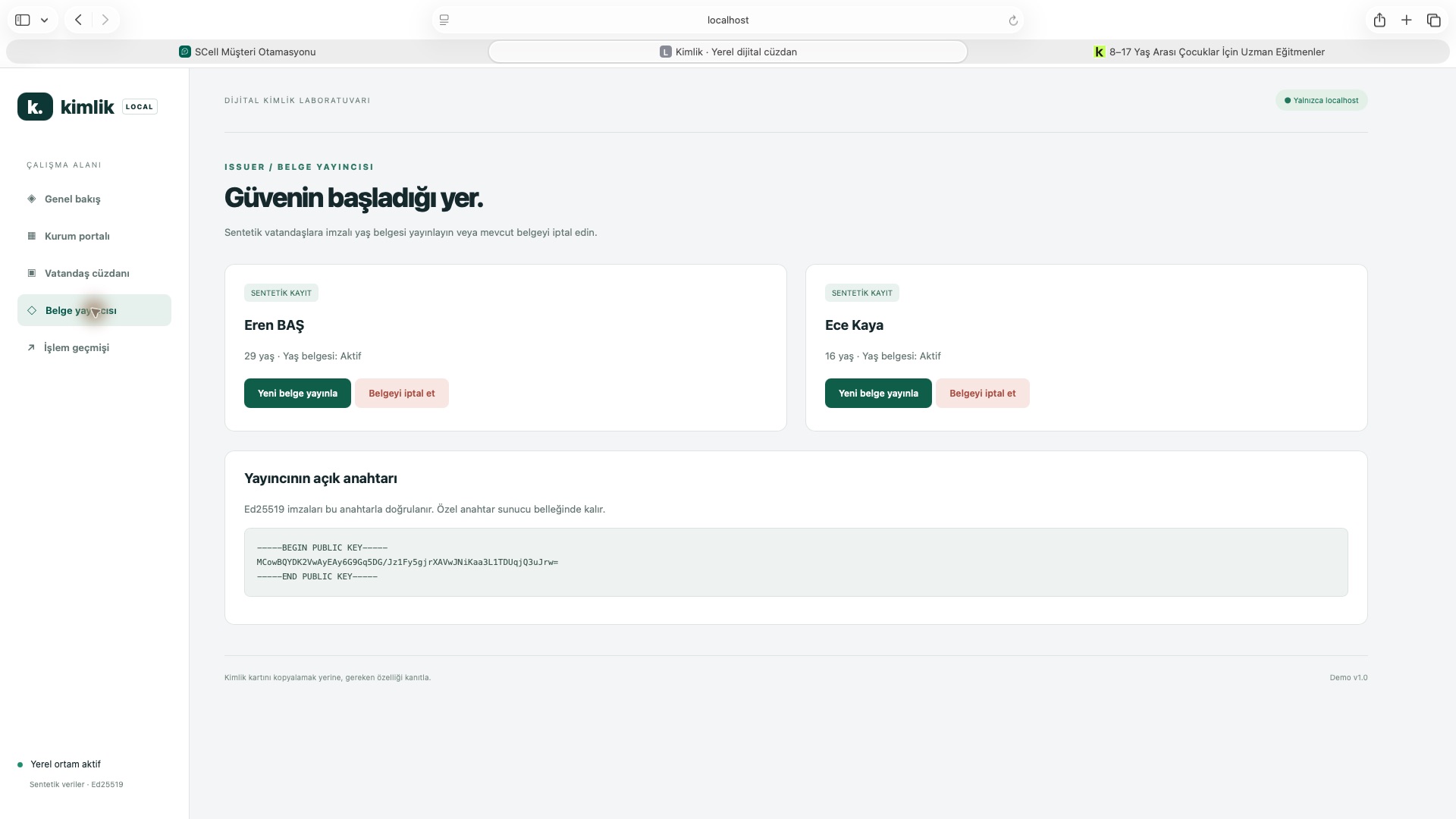
Document issuer screen. The records are synthetic; they can be used by public key verifiers. Screenshot from the initial revision.
The following is the initial local Ed25519 example. The hosted version replaces its final line with await issuer.sign(data, "credential"), which calls the isolated SoftHSM signer:
const payload = {
  issuer: "Yerel Demo Nüfus Kurumu",
  subject: person,
  age_over_18: age >= 18,
  issued_at: Date.now(),
  expires_at: Date.now() + 3600000,
  id: randomUUID()
};

const data = base64url(JSON.stringify(payload));
const signature = Ed25519.sign(data, issuerPrivateKey);
The revocation, reissuance, and expiration of the document are also part of the workflow. Thus, it addresses not only the question “Is the signature valid?” but also “Is the document still valid?”
2. Holder and wallet — the citizen’s wallet
The wallet is the user interface through which the citizen accesses the signed document. It displays the requesting institution, the purpose of the transaction, and the requested fields; the user can select fields individually, decline to share them, and view the transaction receipt afterward.
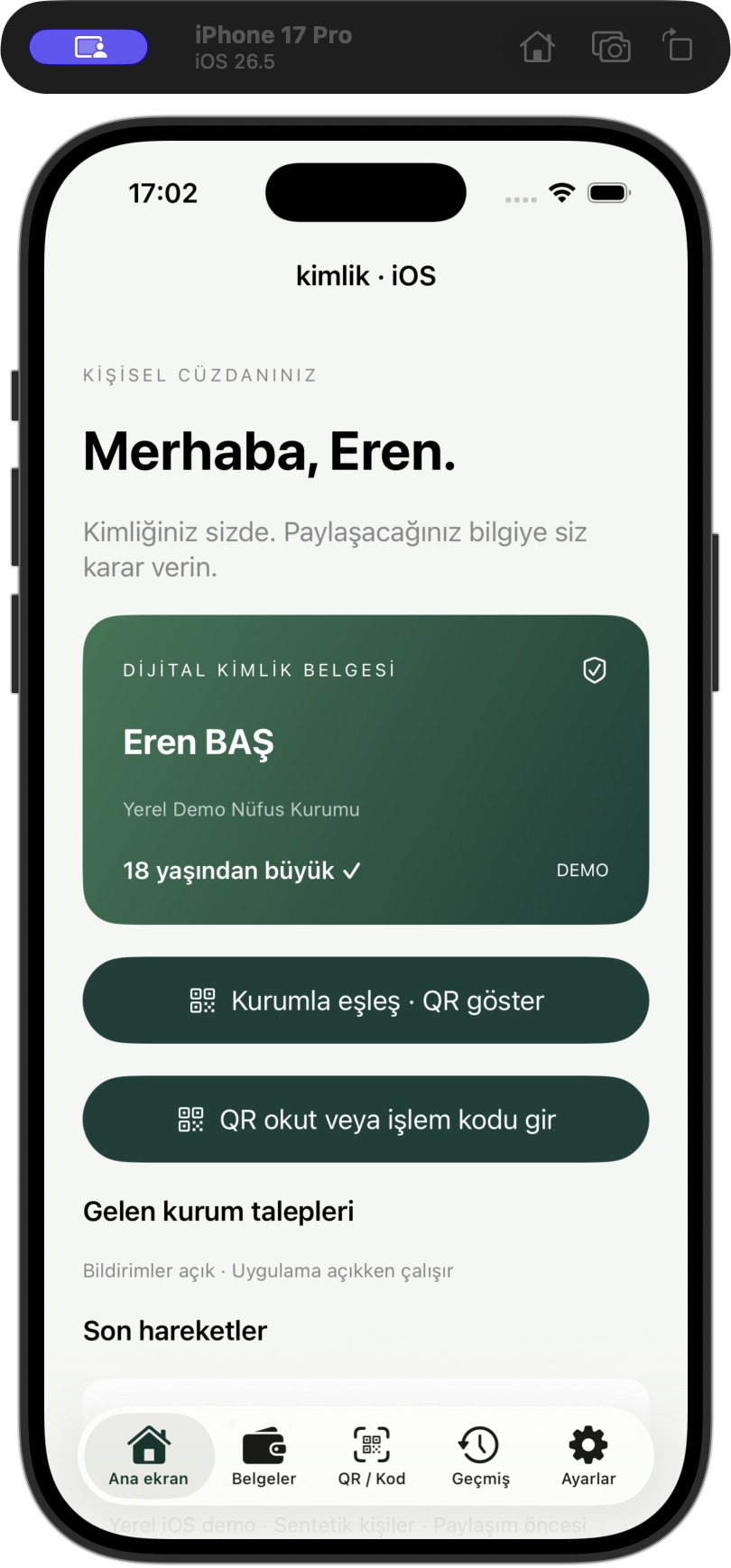
The SwiftUI wallet’s main screen. Documents, pairing, incoming requests, and transactions are all integrated into a single user experience. Screenshot from the initial revision.
The native iOS app was developed using SwiftUI. It uses VisionKit for QR code scanning, LocalAuthentication for device owner verification before sharing, Keychain for local image caching, and the Security framework for the device key.
The wallet’s purpose is not merely to display data. It must provide the user with clear answers to the following questions:
- Which institution sent the request?
- What is the purpose of the transaction?
- Which fields are being requested?
- Which fields will actually be shared?
- When will the request expire?
- What happens if I decline to share the data?
3. Verifier — verifying entity
A verifier requests proof for a specific transaction. The application supports both built-in demo institutions and newly registered institutions. The API checks account identity, field grants and approved templates; a delivery service cannot independently grant itself access to family information, nor a market to a full address.
const scenarios = {
  age: {
    claims: ["age_over_18"],
    merchants: ["shop", "library"]
  },
  residence: {
    claims: ["city", "district"],
    merchants: ["municipality"]
  },
  address: {
    claims: ["city", "district", "street_address", "postal_code"],
    merchants: ["delivery"]
  }
};
It is not sufficient for this check to be performed solely on the user interface. The server also verifies the organization-scenario match and whether the fields selected by the user fall within the scope of the request. Thus, a modified client attempting to add unauthorized fields will not be accepted.
Why three roles instead of a single “identity server”?
Separating the roles makes trust boundaries visible. The issuer is responsible for publishing the correct data, the wallet for protecting the user’s decision and key, and the verifier for expressing its needs in a limited and understandable manner.
The W3C Verifiable Credentials Data Model 2.0 also defines the ecosystem through a three-party structure consisting of the issuer, holder, and verifier roles. The prototype is not a full implementation of this standard; however, the separation of roles and the signed claim approach provide the correct mental model for transitioning to the standard.
Data Model: The Document and the Presentation Are Not the Same Thing
The document the issuer provides to the wallet may contain a broader set of data. However, the presentation sent to the verifier should include only selected fields. In the demo, during presentation generation, the document’s signature and validity period are first verified, and then only authorized and selected fields are added to a new credential:
const selected = requestedClaims.filter(isSelectedByUser);
const disclosed = Object.fromEntries(
  selected.map(key => [key, credential[key]])
);

const proof = {
  issuer: credential.issuer,
  audience: verifierId,
  nonce: request.nonce,
  request_id: request.id,
  ...disclosed,
  expires_at: request.expiresAt,
  pairwise_id: pairwiseIdentifier(person, verifierId)
};
The key distinction here is this: The demo does not technically generate an SD-JWT or a zero-knowledge proof. The issuer service verifies the document and signs a new, short-lived presentation using the selected fields. This is a clear prototype demonstrating the concept of data minimization; it is an online model where the issuer sees every presentation.
Why was an organization-specific identifier used?
Organizations may need to recognize the same person in subsequent transactions. However, assigning the same fixed ID number to every organization facilitates cross-organizational profile merging. Therefore, the prototype generates a different pairwise_id :
pairwise_id = HMAC(
  walletSecret,
  personId + ":" + verifierId
).slice(0, 24)
The same person appears with different identifiers at the grocery store and the library. This mechanism alone does not ensure complete anonymity; however, it is an important design tool that prevents a shared, immutable citizen ID number from circulating in every transaction.
Findings from the initial development phase
The first phase of the prototype demonstrated that digital wallet design involves much more than simply placing a card on a mobile screen. The core work lies in defining role boundaries, request policies, domain-level authorization, document lifecycle, and the decision context to be presented to the user.
In the second part of this series, we will examine step by step why two separate QR codes are used, single-use wallet pairing, the value of the request-based nonce value, the Secure Enclave device signature, and how the sharing result reaches the organization.
Current architecture: an isolated SoftHSM signing boundary
The hosted demo combines an HTTPS portal with a native iPhone wallet. Credential and disclosure-result signatures now use ES256 with a P-256 issuer key in a separate SoftHSM service, rather than an Ed25519 key generated in the main API process. Ed25519 remains a local-development option; the hosted application does not silently fall back to it when the signer fails.
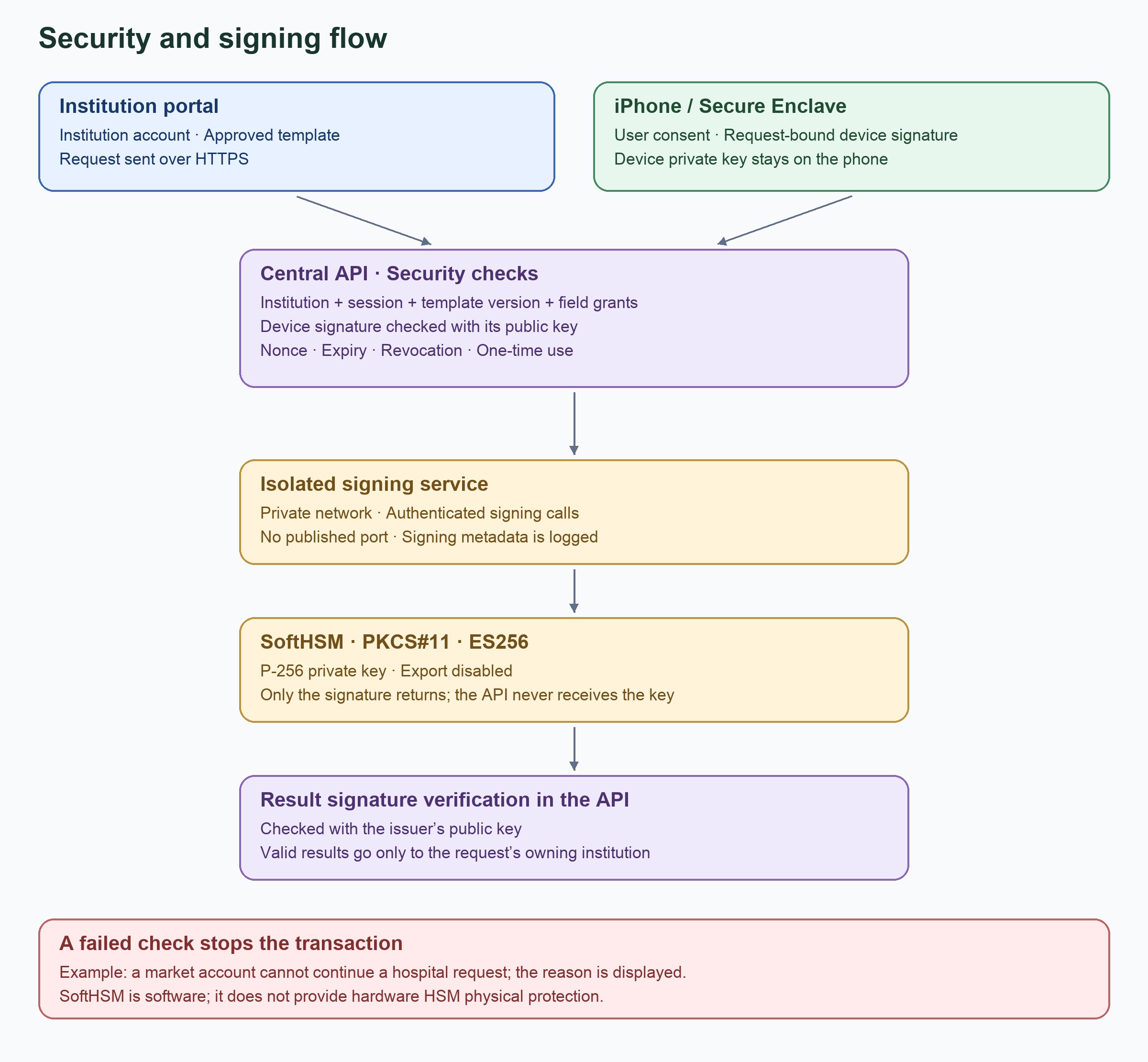
Security flow: institution session, device signature, isolated SoftHSM and central API verification.
- Bind user approval to the request — Location: Real iPhone / Secure Enclave; Key: Device private P-256 key
- Verify the device signature — Location: Central API; Key: Registered device public key
- Sign credentials and results — Location: Isolated service / SoftHSM; Key: Issuer private P-256 key
- Verify issuer signatures — Location: Central API; Key: Issuer public key
The signer has no published Internet port and accepts authenticated calls only over a private Docker network. Its key is created with CKA_SENSITIVE=true and CKA_EXTRACTABLE=false. A persistent token serial selection preserves the key across restarts. The main API receives neither the user PIN nor the SO PIN; it uses a separate signing-service credential.
This is neither hardware HSM protection nor independent verification at each institution. SoftHSM is software and does not provide physical protection against the host administrator. Issuer/verifier business logic and signature verification remain centralized in the API. ES256 signatures over a custom JSON contract also do not make that contract a standard JWS or VC format.
From fixed scenarios to institutions and templates
The “Institutions and templates” menu creates institutions and separate accounts. Administrators approve field grants appropriate to the institution type. Each template revision records the transaction title, purpose, fields, per-field reasons and required/optional settings, and receives a separate review. The latest approved revision becomes a catalogue scenario.
Institutions, scrypt account-password hashes, grants and template revisions persist in SQLite. Requests, device registrations, sessions and receipts remain in memory. Issuer token files have their own persistent volume. The HMAC secret used for pairwise identifiers is persistent too, but has not been moved into SoftHSM.
Credential expiry and synthetic-demo renewal
Synthetic credentials last one hour. A correctly signed, expired credential that has not been revoked is reissued and signed during state reads or presentation; the expired credential is not simply accepted. This demonstration policy does not authorize automatic renewal of real identity credentials.
Authorized users can view the numbered journey and colored security diagram in the Architecture menu.
Resources